


AlgoEco Ai price history

| Date | Open* | High | Low | Close** | Volume |
|---|

On this day
 Today$1.59


Download AlgoEco Ai price historical data
AlgoEco Ai candlestick data
(1 minute-candlestick) Free Download
AlgoEco Ai Historical Data


About AlgoEco Ai Price History Data
AlgoEco Ai price history tracking allows crypto investors to easily monitor the performance of their investment. You can conveniently track the opening value, high, and close for AlgoEco Ai over time, as well as the trade volume. Additionally, you can instantly view the daily change as a percentage, making it effortless to identify days with significant fluctuations.
According to our AlgoEco Ai price history data, its value soared to an unprecedented peak in 2025-12-01, surpassing -- USD.On the other hand, the lowest point in AlgoEco Ai's price trajectory, commonly referred to as the "AlgoEco Ai all-time low", occurred on 2025-12-01.If one had purchased AlgoEco Ai during that time, they would currently enjoy a remarkable profit of 0%.
By design, 50,000,000 AlgoEco Ai will be created. As of now, the circulating supply of AlgoEco Ai is approximately 50,000,000.
All the prices listed on this page are obtained from Bitget, a reliable source. It is crucial to rely on a single source to check your investments, as values may vary among different sellers.
Our historical AlgoEco Ai price dataset includes data at intervals of 1 minute, 1 day, 1 week, and 1 month (open/high/low/close/volume). These datasets have undergone rigorous testing to ensure consistency, completeness, and accuracy. They are specifically designed for trade simulation and backtesting purposes, readily available for free download, and updated in real-time.
AlgoEco Ai Historical Data Use Cases
Here are some of the ways AlgoEco Ai historical data is used in AlgoEco Ai trading:
With these tools and resources, traders can delve into AlgoEco Ai's historical data, gain valuable insights, and potentially enhance their trading strategies.
How to read AlgoEco Ai candlestick data
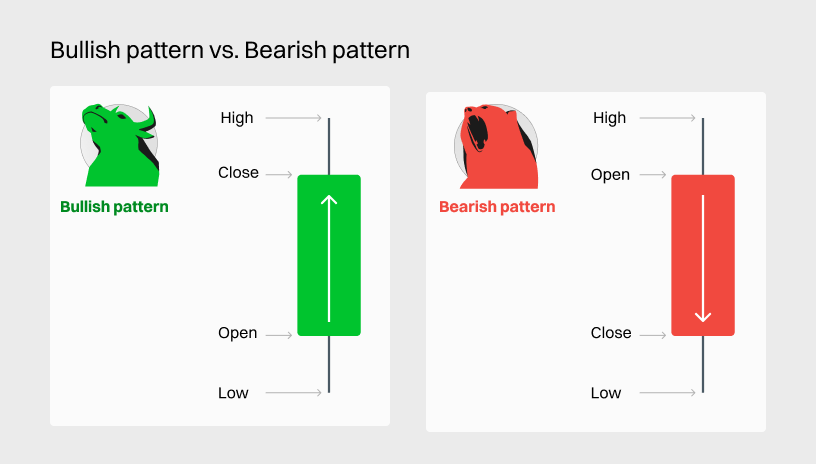
AlgoEco Ai candlestick charts show time across the horizontal axis and price data on the vertical axis, just like line and bar graphs. Candlesticks may have two different colors: green or red. Green candles show that the price went up over the period under consideration, while red candles show that the price declined.
The simple structure of candlesticks can offer users a lot of information. Technical analysts may use candlestick patterns to, for example, identify potential trend reversals.
Based on AlgoEco Ai historical data, when the AlgoEco Ai market exhibits a bearish or bullish trend, conservative investors may opt to use principal-guaranteed products like Smart Trend, Snowball, or Shark Fin to take advantage of the prevailing trend.
Conversely, more aggressive investors may pursue higher returns by investing in non-principal-guaranteed products such as Range Sniper or employing Dual Investment products based on their market direction judgments.
In the case of a sideways market for AlgoEco Ai, utilizing Range Sniper and selecting bullish products to exploit a slight upward trend or bearish products to capitalize on a modest bearish trend may potentially result in improved performance.
To enhance your understanding of profiting from a bullish market trend, you are advised to delve into resources that cover the Bull market support band band and Range Sniper.
Additionally, reading articles on Profiting from bear markets and the The ultimate bear market strategy can provide you with a deeper grasp of these concepts.
FAQ
What is crypto historical data?
Historical Data refers to past information related to cryptocurrencies such as AlgoEco Ai, Ethereum, and others. This data encompasses a wide range of metrics, including price, trading volume, market capitalization, and more.
The significance of crypto historical data lies in its multiple applications within crypto trading. Primarily, it empowers traders and investors to make well-informed choices by gaining a comprehensive understanding of the past performance exhibited by the crypto market.
How to get crypto historical data
There are multiple methods to obtain historical crypto data, but some options have drawbacks. For instance, searching for the ticker of the desired crypto on platforms like Google Finance or Yahoo Finance can be challenging to import into Excel. Additionally, using web scraping techniques may lead to issues such as potential bans and unreliable data retrieval.
To ensure accuracy and reliability, the most recommended approach is to directly download the data from reputable cryptocurrency exchanges like Bitget, Binance, or CoinMarketCap. This allows for seamless integration into your Excel spreadsheet, providing a trustworthy source of historical crypto data.
Benefits of downloading crypto historical data on Bitget
In late 2023, we recognized the need for a centralized platform for cryptocurrency data research. With a long-standing reputation for reliable data, we have been providing FREE access to historical cryptocurrency data for quite some time.As a result, we have become the go-to platform for users seeking comprehensive and accurate information on cryptocurrency markets.
By downloading the historical data available on Bitget, you not only gain access to a wealth of information but also benefit from our expertise in tracking and analyzing cryptocurrency market risks. This data can serve as a valuable starting point for your own personal research or analysis. Feel free to utilize the historical data we offer to enhance your understanding of the cryptocurrency landscape.
What is the format of historical data?
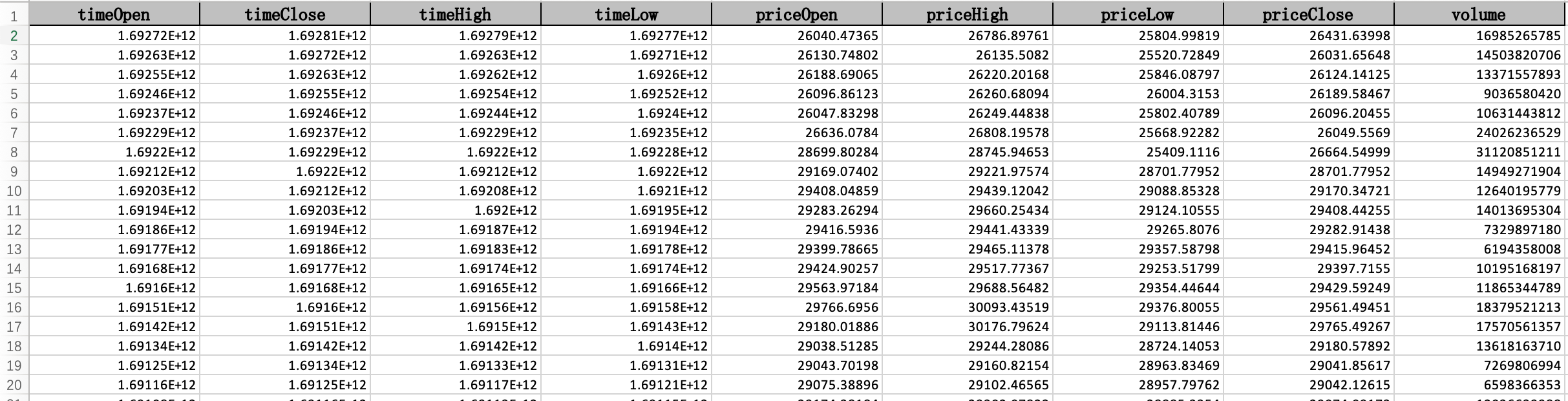
You can download crypto historical data sheets instantly with just one click. The data is provided in an Excel file. If you need to convert the data into a different format (e.g., CSV -> JSON), we recommend ConvertCSV. Screenshot:
What is the update frequency of historical data?
Our crypto prices historical data is updated on a daily basis, similar to how markets are typically updated once a trading day concludes.
In which timezone is historical data displayed?
All our historical data is provided in the GMT+0 time zone.
Why do I get a "frequency too high" error when I click the download button?
To prevent abuse, data for each coin can only be downloaded once per day. Please try again on the following day.