المقالة الحالية لا تدعم اللغة التي اخترتها، تمت التوصية تلقائيًا باللغة العربية نيابة عنك
Why Is My TP/SL Order Triggered but Not Executed in Bitget Futures?
[Estimated reading time: 5 mins]
Take-profit (TP) and stop-loss (SL) orders are essential tools for managing risk and securing profits in Bitget futures trading. However, there may be times when your order doesn't execute, even though the market price reaches your set trigger level. In some cases, the order may even be liquidated. This article explains the common reasons why TP/SL orders may fail to execute, and helps you better understand and improve your trading strategy.
How TP/SL orders work
A TP/SL order is a conditional trigger order. Its execution happens in two steps:
1. Trigger stage: When the system detects that the market price (mark price or last price) reaches the set trigger condition, the TP/SL order is activated.
2. Order stage: After the TP/SL order is activated, the system automatically places a real order into the matching engine based on the user's preset type (limit price or market price), and waits for execution.
Note: The "trigger" of a TP/SL order does not guarantee execution. If the order fails to execute due to market liquidity or price deviation, the position will remain open.
Common reasons why the order fails to close
1. Differences in trigger price types
TP/SL orders support multiple trigger price types, including:
• Market price: The most recent transaction price
• Mark price: The mark price
During volatility, these prices may differ. If the SL order is set based on the last price, but only the mark price reaches the trigger level, the SL order will not be triggered. However, liquidation is determined by the mark price. Therefore, the position may be liquidated based on the mark price before the last transaction price triggers the stop-loss.
2. Order not filled after triggering
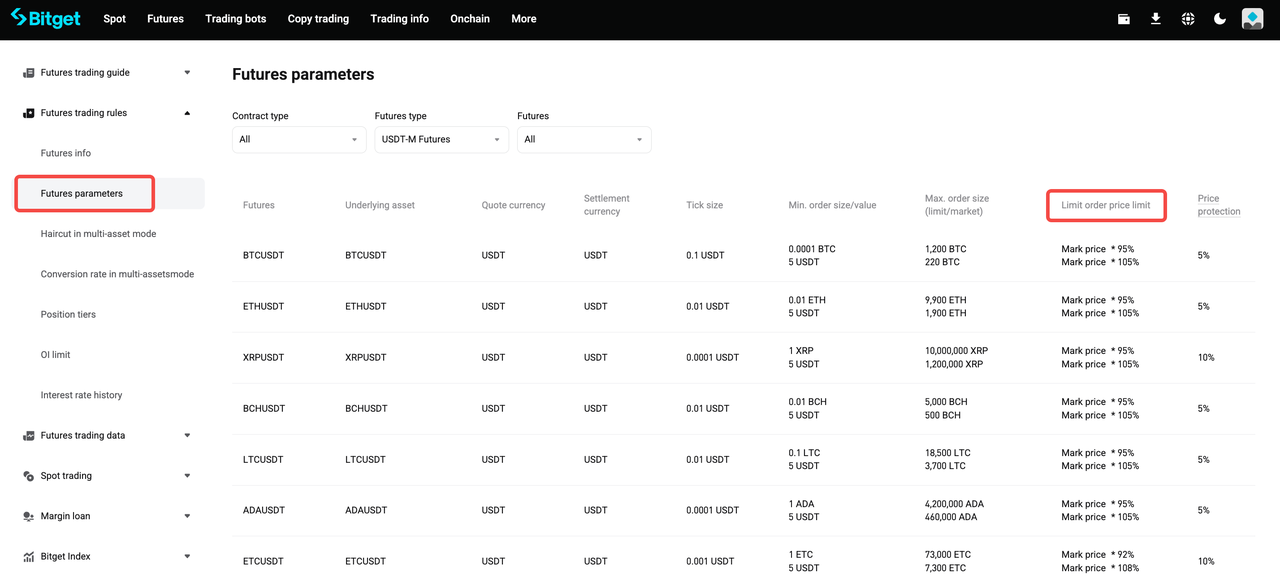
After triggering, the order may fail to execute. This can happen if the order price exceeds the price limit or if the order quantity exceeds the maximum futures order size. For more details, refer to: Futures parameters.
After triggering, the order is placed successfully. However, it is not fully filled. If the market is highly volatile, lacks depth, or has low liquidity at the time of triggering, the following may occur:
• A limit order may remain unfilled if there is no matching order in the market
• A market order may not be fully filled if liquidity is insufficient
3. Invalid parameter settings
Orders may fail if parameters are not set appropriately. For instance, in a stop-loss limit order, setting the order price too far from the trigger price can prevent execution after the order is triggered.
How to optimize your TP/SL settings
To boost the success rate of your TP/SL executions, consider the following strategies:
1. Set a reasonable gap between trigger price and limit price: In volatile markets, it's recommended to leave more room for your limit order price away from the trigger price for a higher chance of execution. For example, if your TP trigger price is 32,000 USDT, consider setting the limit order at 31,950 USDT. When necessary, consider using a market-type TP/SL order.
2. Monitor account margin: Keep sufficient margin in your account to avoid liquidation before the SL order is executed.
3. Pay attention to market depth: Before placing TP/SL orders, check Bitget's market depth data and choose a price range with better liquidity.
4. Use Bitget trading bots and tools: Leverage smart tools like copy trading and grid bots to automate your TP/SL management, reducing the risk of error in manual execution.
Conclusion
Take-profit and stop-loss orders are important risk management tools, but their effectiveness still depends on market volatility, depth, and matching mechanisms. You can significantly improve the execution success rate of your TP/SL orders by optimizing your order parameters, maintaining a healthy margin, and using Bitget's advanced trading tools.
FAQ
1. Why did my TP/SL order trigger but not execute?
The order may not be fully filled if the price exceeds limits, the quantity exceeds the maximum allowed, or if the market is highly volatile or lacks sufficient liquidity when the trigger is reached.
2. What is the difference between market price and mark price for TP/SL orders?
Market price refers to the most recent transaction price, while mark price is a reference used to prevent unfair liquidations. During volatility, these prices can differ, which may affect TP/SL triggering.
3. Can a TP/SL order fail even after it is triggered?
Yes. After triggering, orders may not be filled if the limit price is too far from the market price, if the quantity exceeds maximum limits, or if liquidity is insufficient.
4. How can I reduce the risk of TP/SL orders not being executed?
You can set a reasonable gap between trigger price and limit price, maintain sufficient margin, and choose price ranges with better liquidity. Using market-type TP/SL orders can also help.
5. Can incorrect parameter settings affect TP/SL execution?
Yes. Orders may fail if parameters such as limit price or quantity are set improperly, especially for stop-loss limit orders with prices far from the trigger.
Disclaimer and Risk Warning
All trading tutorials provided by Bitget are for educational purposes only and should not be considered financial advice. The strategies and examples shared are for illustrative purposes and may not reflect actual market conditions. Cryptocurrency trading involves significant risks, including the potential loss of your funds. Past performance does not guarantee future results. Always conduct thorough research and understand the risks involved. Bitget is not responsible for any trading decisions made by users.
Join Bitget, the World's Leading Crypto Exchange and Web3 Company
مشاركة